.jpg?n=63798182084000&preset=size-col-8&bp=lg)
SEL-2523
Annunciator Panel
Monitor demanding applications with the SEL-2523 Annunciator Panel—an alarm panel providing 42 inputs, 11 outputs, and up to four communications ports supporting DNP3, Modbus, and SEL protocols. Simplify commissioning and troubleshooting with a built-in sequence of events (SoE) recorder and full software human-machine interface (HMI). The alarm panel's field-configurable labels enable quick modification if the number or type of monitored devices changes. A wide range of power supply voltages and contact input voltages allow the SEL-2523 to be installed in virtually any system.
Starting At
$5,270Alarm Identification—Apply configurable labels to uniquely identify each alarm point LED. Preprinted labels (with factory default text) and blank labels are shipped with the SEL-2523. Download a template and instructions for printing on blank labels.
Custom Configuration—Create as few or as many points as needed for each application by using programmable logic. Implement multiple alarm panels for high-density alarm applications. Indicate the status of up to 36 alarm points.
Digital I/O Sequential Events Recorder (SER)—Assign different element names to each defined SER point for the asserted and deasserted states. Provide a clear view of an event to operators and viewers.
Monitoring and Control—Test and commission annunciator panels with live device status information on an acSELerator QuickSet SEL-5030 Software HMI screen. Operate and monitor the device remotely from a virtual front panel.
Features
-
- 1
Individually labeled columns and rows for easy identification
- 2
Field-configurable alarm window labels
- 3
Superbright LEDs
- 4
Silence, acknowledge, reset, and test pushbuttons
- 5
Front EIA-232 port for easy access to settings and status
12345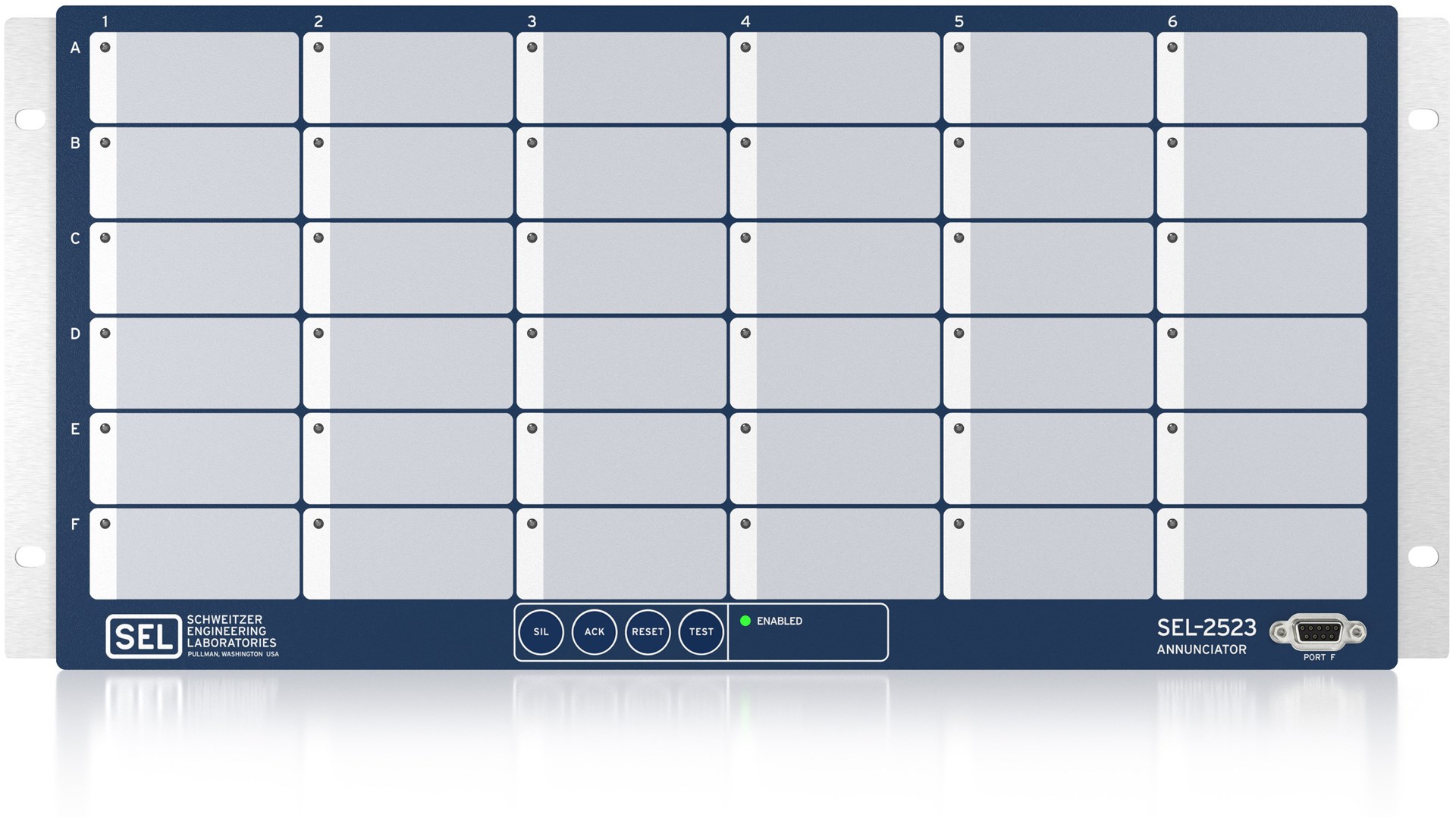
-
-
- 1
Optional communications card with EIA-232 or EIA-485 port
- 2
Optional fiber-optic serial port
- 3
Standard IRIG-B input to time-synchronize alarm inputs to 1 ms
- 4
Standard EIA-232 port for use with DNP3, Modbus, and SEL protocols
- 5
Standard 42 inputs and 11 contact outputs
- 6
Internal hardened power supply for 24–48 Vdc, 110–250 Vdc, or 110—240 Vac supply voltages
123456.jpg?n=63802930818000)
-
Details
Local Annunciation
Select from six ISA-18.1 standard acknowledge sequences.
Communications
Use up to four serial ports to communicate using DNP3, Modbus, or SEL protocols, including Mirrored Bits communications.
Time-Tagged Event Recording
Time-tag alarm events to the nearest millisecond. Report time-tagged messages with DNP3 or the SEL Fast SER protocol.
Easy Installation
Save time with simple wiring and configuration. Print slide-in labels on any printer for easy installation or modification.
Logic Processing
Create custom alarm conditions using programmable logic to combine inputs and communications data without custom wiring.
Reliability
Meet the demands of your harshest environments. The SEL-2523 is designed to exceed stringent vibration, electrostatic discharge, electromagnetic interference, and temperature requirements.

- Annunciation of alarms and operating events.
- Rack mount.

- Annunciation of alarms and operating events.
- Panel mount.
Minimum Software Version
| Product | Revision | Z Number | acSELerator QuickSet Version | SEL Grid Configurator Version |
|---|---|---|---|---|
| SEL-2523 | R202-V0 | 003 | 6.6.0.0 | |
| Please contact Application Engineer for firmware related to your hardware platform. The current revision does not apply to all hardware. | ||||
Latest Firmware Versions
There are no firmware versions available for this product.
| Product | Revision | Firmware ID | Date Available | Serial Number |
|---|---|---|---|---|
| SEL-2523 | R300-V2 | SEL-2523-R300-V2-Z004002-D20260107 | 5/5/26 | ~3261250001 |
The Firmware IDs for older versions of the firmware can typically be found in Appendix A of the instruction manual.
Minimum Software Version
| Product | Revision | Z Number | acSELerator QuickSet Version | SEL Grid Configurator Version |
|---|---|---|---|---|
| SEL-2523 | R202-V0 | 003 | 6.6.0.0 | |
| Please contact Application Engineer for firmware related to your hardware platform. The current revision does not apply to all hardware. | ||||
Instruction Manuals
Sales Resource Central access is required to view the content in this tab.
Sales Resource Central2523 - Software Tab
Configuration
acSELerator QuickSet SEL-5030 Software
QuickSet is a tool for engineers and technicians to quickly and easily configure, commission, and manage power system devices. QuickSet includes a Graphical Logic Editor and a device template tool to reduce configuration time and streamline deployment.
Learn more and download on the QuickSet software page.