
SEL-751A
Feeder Protection Relay
SEL recommends selecting the SEL-751 Feeder Protection Relay in place of the SEL-751A. The SEL-751 supports additional protection and communications options, such as fault location, high-impedance fault detection, EtherNet/IP, and an integrated web server. It is also available with a color touchscreen display.
SEL will continue to support and warranty the SEL-751A.
Starting At
$1,380Feeder Protection—Protect radial and looped distribution circuits with comprehensive protection capabilities, including time-overcurrent, autoreclosing, over-/undervoltage, frequency, and much more.
Arc-Flash Mitigation—Improve safety for personnel with optional arc-flash detection capabilities. The SEL-751A offers combined light and high-speed overcurrent detection for arc-flash events. This combination provides the ideal solution for speed and security.
Automation and Control—Apply the SEL-751A on feeders and provide protection, automation, and control capabilities all in one package. SELogic control equations support many automated applications without the need for additional automation controllers. The configurable front-panel buttons can replace conventional panel controls and simplify overall applications and wiring.
Event Analysis—Conduct post event analysis more efficiently with the detailed event records that are available in the SEL-751A. Combine oscillographic and digital information to find root cause. Add a satellite-synchronized time source, like the SEL-2401 or SEL-2407 Satellite-Synchronized Clocks, for convenient alignment of event information from multiple devices.
Situational Awareness—Improve situational awareness and asset utilization with IEEE C37.118 synchrophasor measurement. Aggregate synchrophasor information from across your system to understand system trends, make decisions based on state measurement rather than state estimation, and aid in post event analysis.
Reliable Protection in Harsh Environments—The SEL-751A operates in extreme conditions, with an operating temperature of –40° to +85°C (–40° to +185°F), and it is designed and tested to exceed applicable standards, including vibration, electromagnetic compatibility, and adverse environmental conditions. In addition, the SEL-751A is Underwriters Laboratories (UL) Class I, Division 2-certified for use in hazardous and potentially explosive environments.






Features
-
- 1
The 2 × 16 character LCD provides navigation, relay control, data, and diagnostics via default messages or up to 32 customizable display messages
- 2
Programmable front-panel LEDs with user-configurable labels alert operators to faulted phases and element operation
- 3
Programmable operator pushbuttons with user-configurable labels allow front-panel customization
123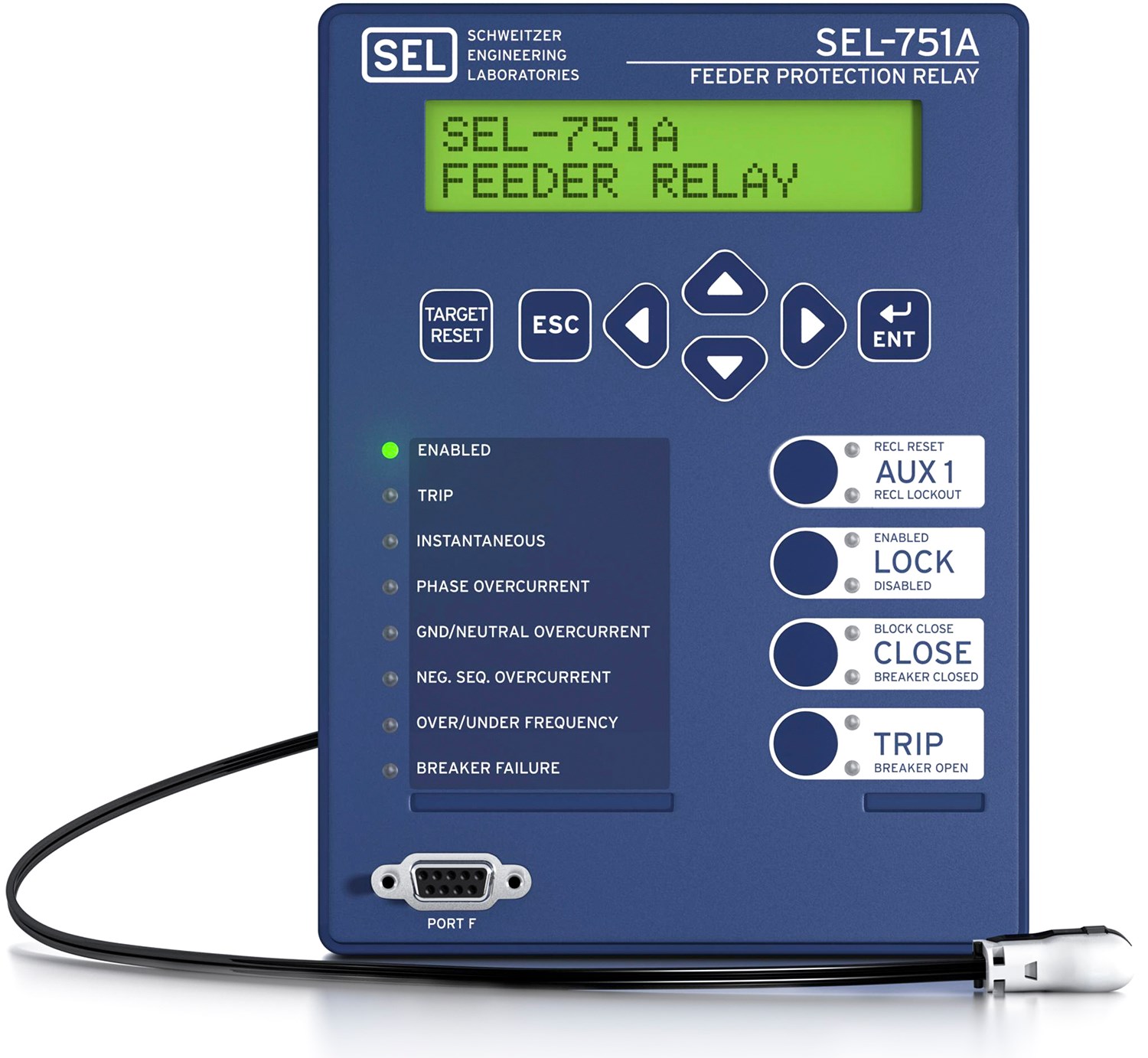
-
-
- 1
A wide variety of communications protocols and media provide flexibility to communicate with other devices and control systems
- 2
Power supply options include 24–48 Vdc or 110–250 Vdc/110–240 Vac
- 3
The optional fiber-optic serial port provides quick and easy engineering access
- 4
Card slots include positions for optional I/O, a voltage input card, or an arc-flash detection card with sensors that help improve safety and prevent damage
- 5
Phase current and optional phase voltage inputs are on one card, freeing up space for additional SELect™ I/O card options
12345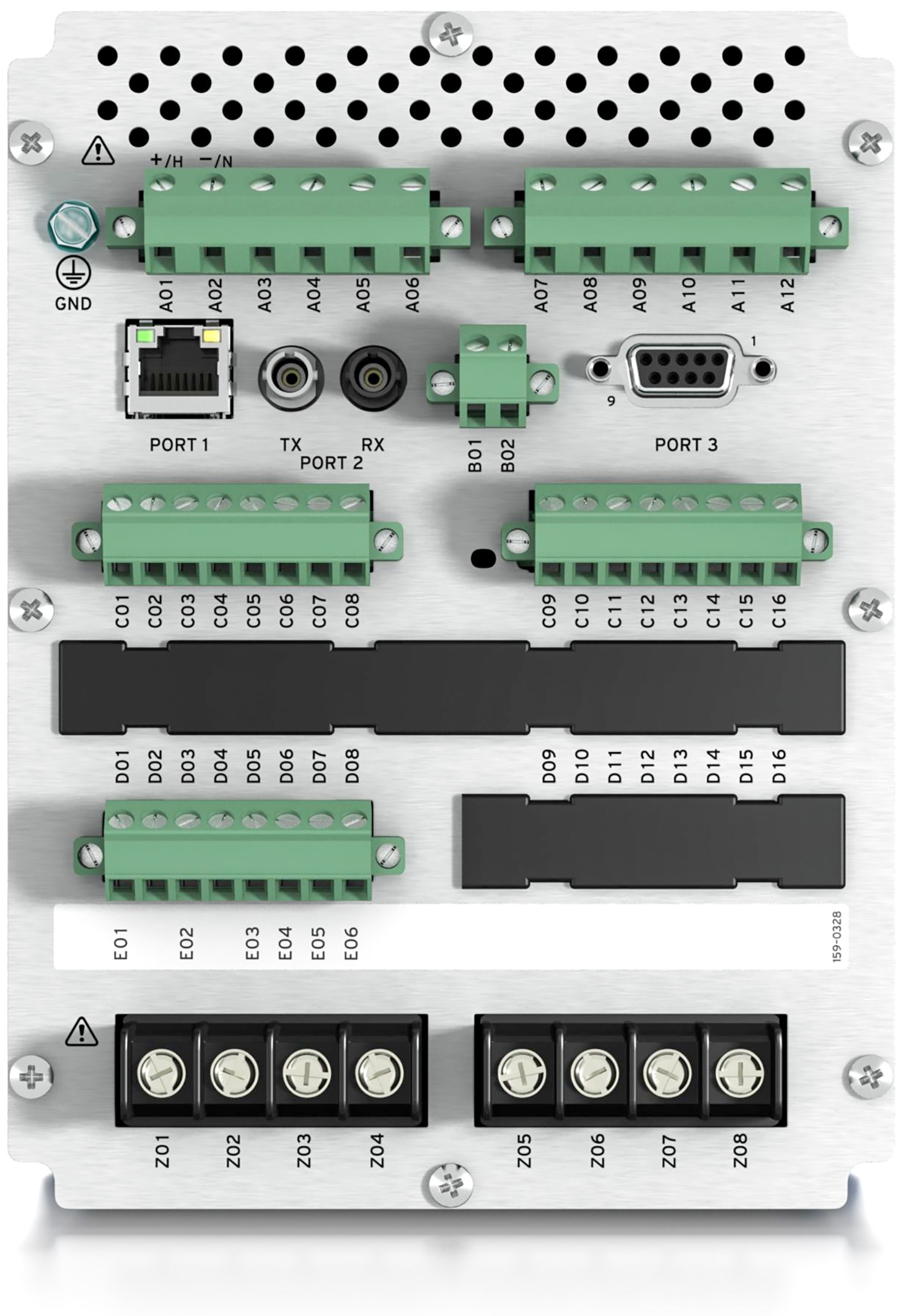
-
Details
Complete Feeder Protection
Maximize control scheme flexibility using time- and instantaneous-overcurrent, overvoltage, undervoltage, and frequency elements with breaker failure protection for one three-pole breaker.
Optional Protection Features
Use the SEL-751A with one of the voltage input options to provide over- and underfrequency, rate-of-change-of-frequency, and over- and undervoltage protection as well as synchronism check, dc station battery monitoring, arc-flash detection, and power and demand metering.
Convenient Controls
Use the four programmable pushbuttons on the front panel for quick, personalized control.
Easy Communications
Choose from Ethernet or serial communications and several protocols, including Mirrored Bits communications and IEC 61850. Pick multiple sessions of Modbus TCP, Modbus Serial, DNP3 LAN/WAN, or DNP3 serial for custom configuration of your applications.
Expanded SELogic Control Equations
Use math and logic combinations of analog and digital values for customized applications. Adapt system control based on prefault conditions. Scale analog values and latch momentary inputs for SCADA retrieval.
Reclosing Control
Match various reclosing practices using the programmable four-shot recloser with optional synchronism check.
Rugged Design
Trust the industry’s widest ambient operating temperature range, –40° to +85°C (–40° to +185°F). The SEL-751A withstands vibration, electrical surges, fast transients, and extreme temperatures, meeting stringent industry standards. A conformal-coating option for the printed circuit boards provides an additional barrier to airborne contaminants, such as hydrogen sulfide, chlorine, salt, and moisture. In addition, the SEL-751A is Underwriters Laboratories (UL) Class I, Division 2-certified for use in hazardous and potentially explosive environments.
Easy Installation
Easily install into existing locations using available retrofit kits and mounting adapters, with no cutting or drilling.
Flexible Design
Choose from many installation and integration options with a small form factor and slide-in expansion cards.

Works well in the following applications:
- Simple feeder protection
- Industrial feeder protection with reclosing
- Electromechanical relay retrofit
Works well in the following applications:
- Simple feeder protection
- Industrial feeder protection without reclosing
- Electromechanical relay retrofit

Works well in the following applications:
- Arc-flash mitigation
- Simple feeder protection
- Feeder monitoring and event collection
Works well in the following applications:
- Advanced feeder protection
- Feeder automation and control
- Intertie protection and control
Minimum Software Version
| Product | Revision | Z Number | acSELerator QuickSet Version | SEL Grid Configurator Version |
|---|---|---|---|---|
| SEL-751A | R419 | 011 | 6.6.0.0 | |
| Please contact Application Engineer for firmware related to your hardware platform. The current revision does not apply to all hardware. | ||||


Latest Firmware Versions
There are no firmware versions available for this product.
| Product | Revision | Firmware ID | Date Available | Serial Number |
|---|---|---|---|---|
| SEL-751A | R421-V4 | SEL-751A-R421-V4-Z013003-D20260130 | 2/17/26 | ~3260480001 |
The Firmware IDs for older versions of the firmware can typically be found in Appendix A of the instruction manual.
Minimum Software Version
| Product | Revision | Z Number | acSELerator QuickSet Version | SEL Grid Configurator Version |
|---|---|---|---|---|
| SEL-751A | R419 | 011 | 6.6.0.0 | |
| Please contact Application Engineer for firmware related to your hardware platform. The current revision does not apply to all hardware. | ||||
Instruction Manuals
Sales Resource Central access is required to view the content in this tab.
Sales Resource Central751A - Software Tab
Configuration
acSELerator QuickSet SEL-5030 Software
QuickSet is a tool for engineers and technicians to quickly and easily configure, commission, and manage power system devices. QuickSet includes a Graphical Logic Editor and a device template tool to reduce configuration time and streamline deployment.
Learn more and download on the QuickSet software page.
acSELerator Architect SEL-5032 Software
Architect allows users to configure and document IEC 61850 systems that include GOOSE, Sampled Values (SV), or Manufacturing Message Specification (MMS) communications. Architect automatically compares SCL files with IEC 61850 requirements to ensure standard compliance.
Learn more and download on the Architect software page.
Automated Data Collection
SEL Device Management and Automation (DMA) Application Suite
Available on the Blueframe platform, DMA applications automatically collect, store, and manage device-specific information like oscillography, Sequence of Events (SOE) data, device settings, and property information. They also provide automated password rotation and streamlined device audits.
Learn more on the DMA software page.
Visualization and Analysis
SEL-5601-2 Synchrowave Event Software
Synchrowave Event helps engineers diagnose a protective relay’s behavior during a power system fault. It is a powerful and easy-to-use solution for displaying and analyzing SEL relay event reports and COMTRADE files.
Learn more and download on the Synchrowave Event software page.